“Did my hours go through?”
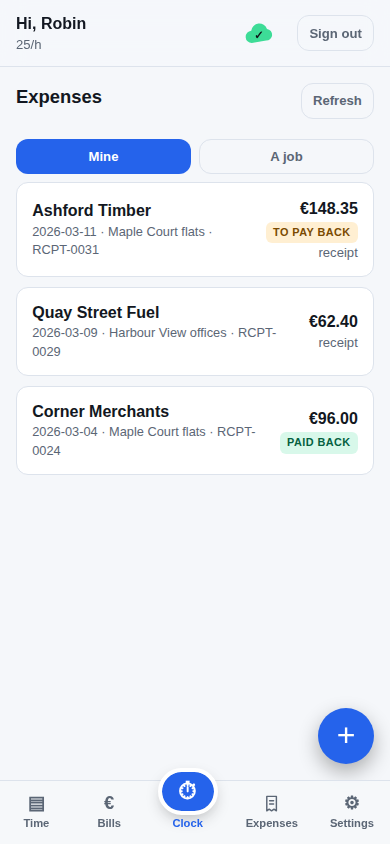
See what’s saved, what’s sending and what needs attention. Forgot to start? Add the time afterwards. Paid for materials? Record the receipt against the job.
See the crew’s tools ↗Connect this app to Zoho Books. It only has to be done once.
The value you set with wrangler secret put SETUP_SECRET.
Open the Zoho API console, choose Add Client → Server-based Applications, and fill it in exactly like this:
The redirect URI must match character for character, or Zoho refuses the connection. Zoho then shows a Client ID and Client Secret — paste them below.
You will be sent to Zoho to approve access, then returned here. Make sure this exact redirect URI is registered on your Zoho client:
—
Creates the Users and Timesheet custom modules and their fields in Zoho Books, then reads them back to confirm.
This account is an admin and can add the rest from inside the app.
Your crew has done the work. The office shouldn’t have to piece it together. Capture time on site, even offline. Bring it straight into Zoho Books.
Try it free for 30 days. No card. No chasing. A GOOD DAY’S WORK. ACCOUNTED FOR.
16:30 / TOOLS DOWN
Meadow Lane · Site work
Basements lose signal. People forget timesheets. Fridays fill up with messages. Clocker is built around the way a real crew’s day actually goes.
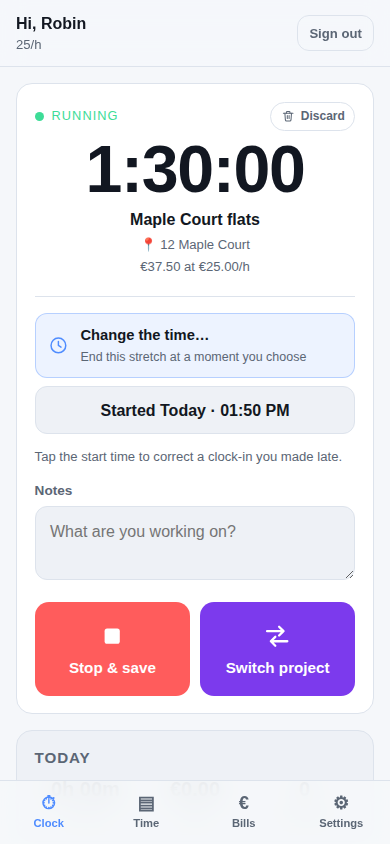
Pick the job. Start the timer. Get to work.
REAL APP SCREENS / EXAMPLE DATA
For trades, site teams and subcontractors. And the person back at the office who makes all those hours add up.
See what’s saved, what’s sending and what needs attention. Forgot to start? Add the time afterwards. Paid for materials? Record the receipt against the job.
See the crew’s tools ↗Projects keep time in the right place. Managers can see their team’s hours. A shared tablet lets the crew clock with a PIN when personal phones aren’t practical.
Explore projects and kiosk ↗Review hours by person. Generate vendor bills in your own Zoho Books. Billed entries lock, so a later edit can’t quietly change what you’ve already billed.
Follow the hours into Books ↗The “what time did you finish?” messages. The half-remembered site names. The same hours typed out twice. Give that routine somewhere better to go.
Work out the difference for your crew ↗THE WORKFLOW, ILLUSTRATED.
You review the hours and choose when to generate bills.
Offline clocking, project time, receipts and the shared kiosk. Included from day one. Each worker uses Clocker without their own Zoho Books login.
Billed annually. Minimum 3 people.
From €288 a year. Your Zoho Books subscription is separate; a plan supporting custom modules is required.
You need a Zoho Books organisation with support for custom modules, and access to connect it. Setup checks the modules and fields Clocker needs. Plan availability varies, so check your organisation before rolling out to the crew.
After signing in and loading your projects, phone clocking works offline. Entries stay on that device until they sync. The sync indicator tells you when they’ve reached Books. Keep the app’s saved data until syncing is complete. Initial setup and billing need a connection.
There is no app store and nothing to approve. On Android, open the link in Chrome and it offers to install; if it doesn’t, the ⋮ menu has “Install app”. On an iPhone or iPad, open it in Safari, tap Share and then “Add to Home Screen”. After that it opens full screen like any other app. The steps are written out again inside Clocker, under Settings → Install on your phone, for whoever is setting up the phones.
No Zoho Books login is needed for each worker. Give them a Clocker account on their phone, or pair a shared tablet and let them clock with their own PIN. Kiosk access is limited to clocking.
Synced time records and bills live in your Zoho Books. Clocker also keeps offline data on devices and stores the account, connection and service information needed to operate. Staff see their own records; managers and admins have access based on their role and project assignments.
Create a workspace, connect Zoho Books and let Clocker check its modules. Then add your team and run a first clock-in. You’ll need your Books administrator for the connection. Start with a small group during the free trial.
The trial lasts 30 days, without a credit card. Continued app access needs an active licence. Your synced records remain in your Zoho Books if you decide not to continue. Pricing is annual, starting with three people.
Start with your next job. See what a calmer week feels like.
No credit card required.No tiers to compare, no feature held back to sell you an upgrade. What a company of four gets is what a company of forty gets.
Billed annually.
Minimum three people — so the smallest is €24 a month, €288 a year.
30 days free. No credit card required.
Nothing is charged during the trial. Your time entries live in your own Zoho Books, and stay there whatever you decide at the end of it.
Connect your Books, put your crew on it, and see what comes back. The thirty days are free and charge nothing — the annual term only begins if you decide to keep it.
30 days free. No credit card required.
A time clock built for people who work away from a desk, and for the office that has to bill what they did. It lives inside your own Zoho Books — no second ledger, no export step.
The people clocking in do not have to be on your payroll, and none of them needs a Zoho Books login. They use their own Clocker account, while your office keeps working in the Zoho Books organisation it already knows.
Clocker keeps its own accounts in a module it creates in your organisation. Add ten people or a hundred without giving each a Zoho login. Your Books plan must support custom modules. Clocker's own price is €8 per person per month — see .
Link a freelancer to their vendor record in Books. Their hours become a vendor bill — one bill, one line per entry, the project named on each — ready to pay the way you pay every other supplier.
Everything is written to the phone first and sent when there is a connection. A basement, a lift shaft, a site with no coverage — none of it costs anybody their afternoon, and nothing has to be remembered and typed in later.
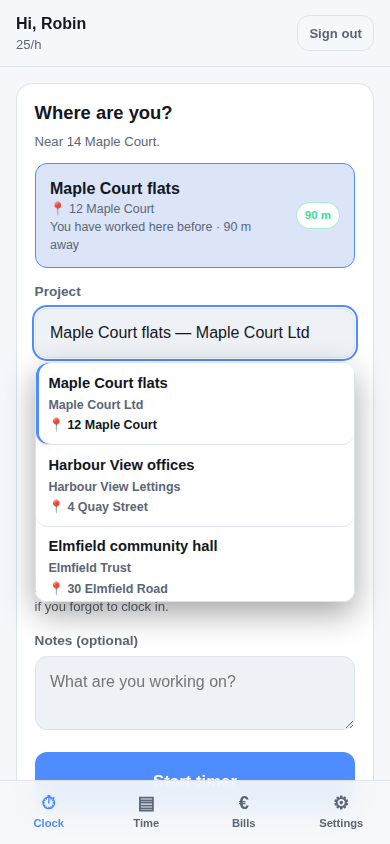
The project is guessed from where the phone is standing, and it learns: after a few clock-ins it knows the site better than the billing address does. Every project shows its street, because the office's name for a job means nothing to the person standing outside it.
Moving from one job to the next is one tap. The old timer stops and the new one starts on the same instant, so a day of driving between sites still adds up exactly.
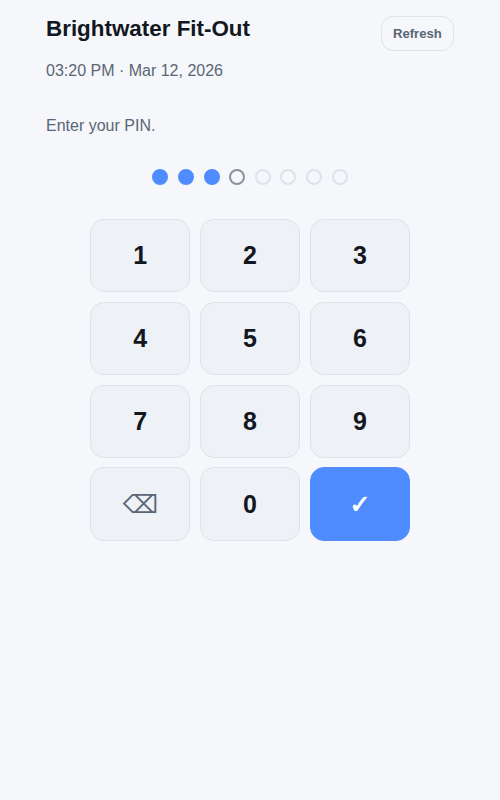
Put a tablet on the wall, or an old Windows PC in the corner of the workshop. It is the same
Clocker at your-company/kiosk — nothing to install.
No list of names to tap first: somebody types their PIN and it knows who they are. Quicker, and quieter — a screen on a wall no longer publishes your roster to everyone walking past.
A countdown runs the whole time somebody is signed in and resets whenever they touch the screen. Ten seconds after they walk away, the tablet is locked again and holds nothing about them.
Clocking in, out and switching project — that is all it opens. Reading somebody's hours or changing their password needs their password, on their own device.
Clock in on the way past and the timer is already running when you open the app in the van. Same record, either end.
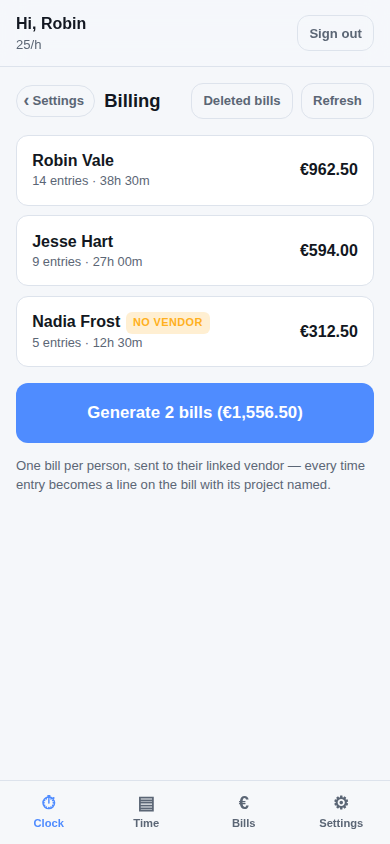
See what is unbilled, per person, then turn it into vendor bills in Zoho Books in one go. Every time entry becomes a line with its project named, so the bill explains itself to whoever approves it.
Bills get redone. When one is deleted in Books, the hours on it go back to unbilled and are picked up by the next run — rather than vanishing into a bill that no longer exists.
Staff see the projects they are assigned to and their own hours. Managers see every hour on the projects they run. Admins see the lot.
A docket photographed where it is handed over is a docket that gets recorded. The supplier, what was bought, the job it was for and the VAT off your own Books settings — then the photo goes onto the expense in Zoho Books.
Add the supplier from the same screen, with their address, VAT number, phone and email. Sending somebody to find an admin first is how receipts stop being recorded.
Say whose money it was. A company card is the end of it; somebody's own pocket is booked so the company owes them, and the next vendor bill pays it back — counted once, not twice.
Staff see what they submitted, a project's manager sees everything booked to that project, and admins see all of it.
Times can be fixed afterwards — a forgotten clock-in rewound, a stop time corrected, an entry deleted. Anything already on a bill is locked.
Add it to the home screen and it opens like any other app. It is a web page, so there is nothing to update and no store to wait for.
Your company's name and logo, taken from Zoho Books, on the screen your crew signs in to.
Every company gets its own address. Send it once; the app remembers which company the phone belongs to.
Unsent time is kept on the device and shown as such. A cloud on the Time tab says whether everything has reached Books.
Passwords and PINs are stretched on the device; only a derived proof is ever sent. Your Zoho credentials never leave your Zoho account.
It follows the device by default, and keeps following it when the phone turns dark at sunset. A stated choice outranks that and is remembered.
A new version installs quietly and waits. A bar says it is ready with a button to take it — never mid-way through stopping a timer.
30 days free. No credit card required.
Your synced time records stay in your own Zoho organisation.
Site time tracking, straight into Zoho Books.
Your company gets its own Clocker, connected to your own Zoho Books.
30 days free. No credit card required.
Your daily workspace
One job at a time.
Every hour accounted for.
Your company has a shared tablet. A PIN lets you clock in and out on it — it is the only thing the tablet needs to know who you are.
Tap the start time to correct a clock-in you made late.
Filled with now — scroll the hour and minute to rewind if you forgot to clock in.
The day so far
Belgian numbers are checked against their own check digits before they are saved.
Paid out of your own pocket: this goes on your next bill so you get it back.
A photo of the docket, or its PDF. It is attached to the expense in Zoho Books.
This job is no longer on your phone, so no new time can be added to it. The hours already against it are still yours and still counted here.
This is the project’s status in Zoho Books. Turning it off marks the project inactive there, takes the job off the crew’s phones and refuses new time against it. The hours already on it stay where they are, and everyone can still see them under Projects.
Only the people listed here can clock time to this job, and only on the days their dates allow. This list is read from Zoho Books each time you open the job, and anyone added here is on their phone straight away — so opening a job is also how somebody added in Books gets there.
—
Dark, light, or whatever this device is set to. Remembered on this device only.
—
—
Set this up and you sign in by unlocking the phone, instead of typing your password. The key stays in this device — it is never sent anywhere, and nobody at Clocker can read it. Your password still works, on this device and on any other.
Four to eight digits, typed on the shared tablet to clock in. It is how the kiosk knows who you are, so no two people in the company can have the same one — and nothing that repeats a digit or runs in order, since those are the first anybody tries.
On the home screen Clocker opens full screen, like any other app, and keeps working with no signal. There is no app store to go through: it is a web page, so it updates itself and takes up almost nothing.
One bill per person, sent to their linked vendor — every time entry becomes a line on the bill with its project named.
Chosen once, for everybody. Staff submitting a receipt never see these.
A current-liability account, such as “Employee reimbursements”. When somebody pays with their own money the expense passes through it, so the company owes them — and the reimbursement line on their next bill, booked to the same account, clears it. Booking that line to a cost account instead would count the same purchase twice.
A shared screen — a tablet on the wall, or a PC in the corner — that the whole team clocks in and out on. Each person types their own PIN, and it locks itself again a few seconds later.
Kiosk address — open this on the device:
Give people a PIN on the Users page — anyone without one cannot use the kiosk.
A manager sees everybody’s hours on this job. It applies to this job only — somebody can run one site and work on another.
Dates decide which days they may book time for, so ending a stint never blocks them from correcting the hours they already worked.
Every entry that is not yet billed and was started on or after this day is repriced at the new rate, and so is everything they clock from now on. Entries already on a bill, and entries before this day, keep the rate they were worked at.
Four to eight digits, typed on the kiosk to clock in. The PIN is how the kiosk knows who you are, so no two people in the company can share one — and nothing that repeats a digit or runs in order, since those are the first anybody tries.
This workspace's licence has expired.
Time already on this device is safe — nothing has been deleted. It stays here and syncs to Zoho Books as soon as the licence is active again.
Contact whoever provides your Clocker to reactivate it.
Your account was created with a temporary password. Set your own to continue.
This time will not be saved anywhere and cannot be recovered. To keep it, stop the timer instead — you can correct the times afterwards on the Time tab.
The current timer is saved up to this moment and the new one starts from it — no gap.
Add it to your home screen so it opens like an app and keeps working with no signal.